Server Does Not Support Any Versions
Error Description
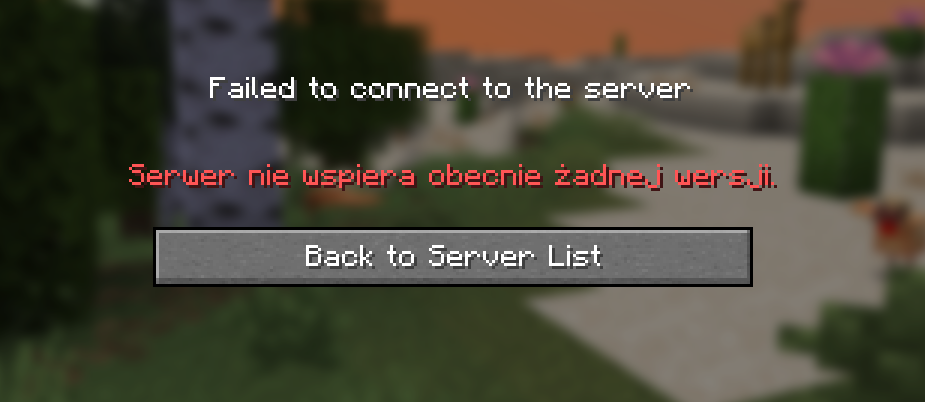
Players cannot join the server because no Minecraft versions are enabled in Goxy network settings. The Minecraft client displays: "The server does not currently support any versions" or a similar version-related error.
⚠️Error Symptoms
Players see in the Minecraft client:
- "The server does not currently support any versions."
Error Screenshot
Possible Causes
🔍What Could Be the Cause?
- No versions selected: In the Versions tab in the Goxy Dashboard, no Minecraft versions are checked.
Fix Steps
🔧How to Fix the Error?
- Check version settings in the Goxy Dashboard:
- Log in to the dashboard.
- Go to the Versions tab in network settings.
- Select supported Minecraft versions (e.g., 1.20.1, 1.19.4).
- See the Version Setup Guide.
- Restart your server:
- Restart the Minecraft server and check console logs (
latest.log) for version-related errors.
- Restart the Minecraft server and check console logs (
- Contact support:
- If the issue persists, reach out on Discord.
Additional Notes
💡Tips & Advice
- Ensure selected versions in Goxy match your server's Minecraft version (e.g., Paper/Spigot).
- Regularly update the Goxy plugin to support the latest game versions.
- If using Bedrock Edition, check support settings in the Bedrock Guide.
- Check Goxy server status at status.goxy.io.
✅Error Fixed!
After completing the steps, your server should support the selected Minecraft versions. If the issue persists, contact us.
Links
🌐 Our website is available at goxy.io
🖥️ Goxy dashboard is available here
⏳ Suspect a breakdown? Check our status page
💬 Want more about Goxy? Head to Discord
🤩 Look at the awesome curated list
📘 Read the API documentation