Login & Registration Settings
This step-by-step guide will walk you through configuring login and registration methods and limits in the Goxy Dashboard. You can define who needs to log in, how players are authenticated with Mojang servers, session memory, and account/login attempt limits. Ready to customize the authentication process for your network?
Configure login and registration in minutes to ensure security and convenience for your players!
Before You Begin
In this section, you'll configure who must log in, how players are authenticated with Mojang, how session memory works, and limits for registration and login attempts. These settings help you control security and access to your network.
Automatic login for Premium accounts requires proper authentication with Mojang servers. Ensure your settings match your requirements.
Configuring Login & Registration
Step 1: Go to the Login & Registration Section
- In the Goxy Dashboard, go to your network settings.
- Select Configuration, then the Login & Registration tab.
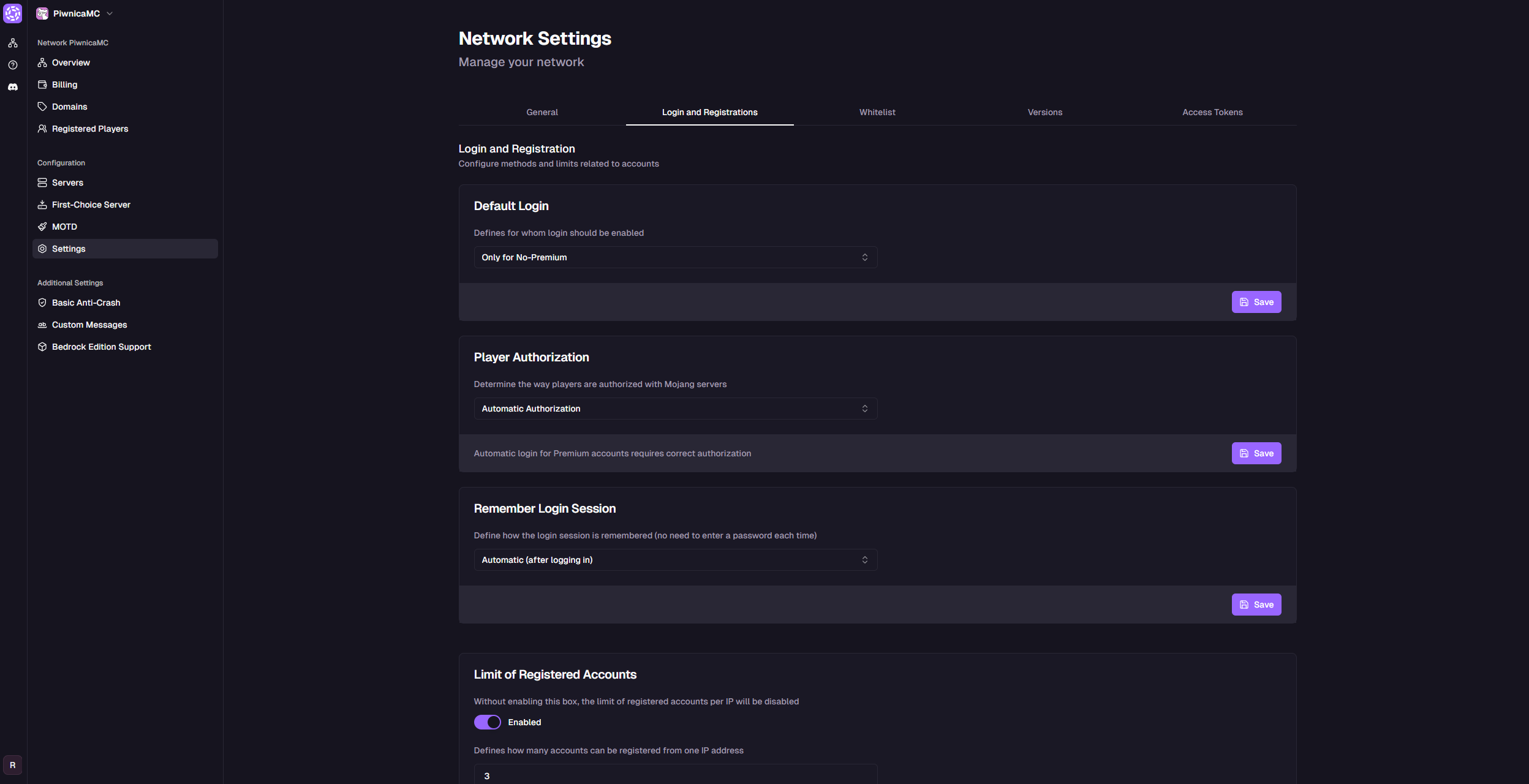
- You'll see options to configure account methods and limits.
Step 2: Configure Login Settings
-
Default Login Requirement Specify who must log in with a password. Available options:
Option Description Disabled for All No password login required for anyone. For All (Premium & Non-Premium) All players must log in with a password. Only for Non-Premium Only players without Premium accounts must log in with a password. Default: Only for Non-Premium
-
Click Save.
-
Player Authentication Define how players are verified with Mojang servers. Available options:
Option Description Automatic Authentication Automatically verifies Premium accounts with Mojang. Do Not Authenticate Anyone No Mojang authentication. Authenticate Everyone Authenticate all players regardless of account status. Default: Automatic Authentication
Premium auto-login only works with Automatic Authentication enabled.
-
Click Save.
-
Session Memory Control how login sessions are remembered so players don't need to re-enter passwords. Available options:
Option Description Automatic (After Login) Session saved automatically after login. Disabled No session memory - password required every time. Manual (Via Command) Session saved only after using a command (e.g., /remember).Default: Automatic (After Login)
-
Click Save.
Login methods and authentication are ready for your network!
Step 3: Configure Registration & Login Limits
-
Registered Accounts Limit Set the maximum number of accounts that can be registered from one IP.
- Enabled/Disabled: Check to enable.
- Limit: 3 accounts (default).
- Track IP used during registration: Enabled (default).
-
Click Save.
-
Delay Between Account Registrations Set the minimum time (in minutes) between new account registrations from the same IP.
- Time: 0 minutes (default, no delay).
-
Click Save.
-
Failed Login Attempts per Player Account Limit the number of failed login attempts per player account.
- Enabled/Disabled: Check to enable.
- Limit: 5 attempts (default).
-
Click Save.
-
Failed Login Attempts per IP Limit failed login attempts from a single IP and set a cooldown period.
- Enabled/Disabled: Check to enable.
- Limit: 10 attempts (default).
- Time window to exceed limit: 3600 seconds (1 hour, default).
-
Click Save.
-
IP Login Cooldown After Failed Attempts Set the cooldown time (in seconds) an IP must wait after exceeding failed login attempts.
- Time: 300 seconds (5 minutes, default).
-
Click Save.
Login and registration limits are active - your network is now more secure!
Security
Limits and authentication protect your network from unauthorized access.
Flexibility
Tailor login and registration to fit your network's needs.
Convenience
Session memory makes it easy for players to reconnect.
Links
Contact us!
We respond to all messages within 24 hours on Discord.
Secure Your Network with Smart Login Settings!
Join Goxy and deliver a safe, seamless experience!
REGISTER FOR FREE