Error During Target Server Lookup
Error Description
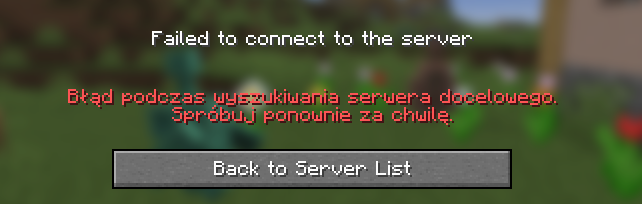
Players may encounter issues joining the network due to an error during target server lookup. This is typically caused by incorrectly configured search conditions or a rare issue on our side (with a near-zero probability). If you are using a custom webhook, it may have failed and returned an error, such as a 500 status code or any code other than 200. Please try again in a moment.
⚠️Error Symptoms
Players may see connection failure messages, and server logs (latest.log) may indicate errors related to server lookup or webhook issues.
Error Screenshot
Possible Causes
🔍What Could Be the Cause?
- Incorrect configuration: The user has set invalid conditions for target server lookup.
- Issue on our side: A rare system failure (probability close to zero).
- Webhook failure: If using a custom webhook, it may be malfunctioning and returning error codes like 500 instead of the expected 200.
Fix Steps
🔧How to Fix the Error?
- Try again in a moment:
- Wait a few minutes and attempt to join the network again.
- Check configuration conditions:
- Log in to the Goxy Dashboard.
- Go to the Network Settings section and verify the target server lookup conditions.
- Ensure they are correct (e.g., valid IP address and port).
- Verify custom webhook (if used):
- If you've configured a custom webhook, check its functionality and ensure it returns a 200 status code.
- If a 500 error or another code is returned, fix the webhook configuration or contact your service provider.
- Contact support:
- If the issue persists, reach out on Discord - we can assist with further troubleshooting.
Additional Notes
💡Tips & Advice
- If the issue involves a webhook, test it using tools like Postman to verify the response.
- Regularly check the status on status.goxy.io in case of issues on our side.
- Ensure all settings in the Goxy Dashboard are up to date.
✅Error Fixed!
After correcting the configuration or system recovery, your server should function correctly. If the issue persists, contact us.
Links
🌐 Our website is available at goxy.io
🖥️ Goxy dashboard is available here
⏳ Suspect a breakdown? Check our status page
💬 Want more about Goxy? Head to Discord
🤩 Look at the awesome curated list
📘 Read the API documentation