Goxy Plugin Configuration Error
Error Description
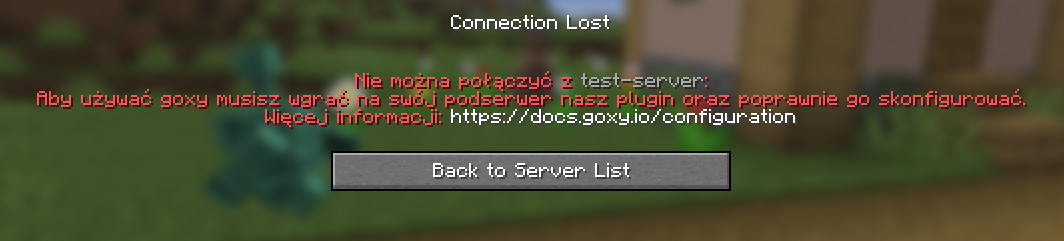
Players cannot join sub-servers in the Goxy network because the Goxy plugin is missing on the target server or is misconfigured (e.g., invalid or missing token in config.yml). The issue manifests as connection errors or lack of synchronization with the Goxy dashboard.
⚠️Error Symptoms
Players see connection errors in the Minecraft client.
Server logs (latest.log) may show errors related to:
- Missing Goxy plugin
- Invalid or missing token
Error Screenshot
Possible Causes
🔍What Could Be the Cause?
- Goxy plugin not installed: The plugin is not in the
pluginsfolder of the target server. - Missing token: The
config.ymlfile lacks a valid token generated in the Goxy Dashboard. - Incorrect configuration: Token or other settings in
config.ymlare wrong or outdated. - Subserver not added: The target server is not registered in the Goxy Dashboard.
Fix Steps
🔧How to Fix the Error?
- Install the Goxy plugin:
- Download the latest version from the Goxy Dashboard.
- Upload the
.jarfile to thepluginsfolder on the target server (e.g., Paper/Spigot). - See Network Setup Guide.
- Generate and configure the token:
- Log in to the Goxy Dashboard.
- Generate a new token in network settings.
- Paste it into
config.ymlin the Goxy plugin folder on the server. - See Token Setup Guide.
- Verify sub-server configuration:
- In the Goxy Dashboard, ensure the sub-server is added to the network.
- Confirm the IP and port are correct.
- See Add Server Guide.
- Reset plugin configuration:
- Stop the server.
- Delete
config.ymlin the Goxy plugin folder. - Restart the server - the plugin will generate a new
config.yml. - Re-enter the token as in step 2.
- Update the Goxy plugin:
- Download the latest version from the Goxy Dashboard and replace the old
.jarinplugins.
- Download the latest version from the Goxy Dashboard and replace the old
- Restart the server:
- Restart and check console logs (
latest.log) for Goxy plugin errors.
- Restart and check console logs (
- Contact support:
- If the issue persists, reach out on Discord.
✅Error Fixed!
After completing the steps, your server should sync correctly with Goxy. If the issue persists, contact us.
Links
🌐 Our website is available at goxy.io
🖥️ Goxy dashboard is available here
⏳ Suspect a breakdown? Check our status page
💬 Want more about Goxy? Head to Discord
🤩 Look at the awesome curated list
📘 Read the API documentation