Help & Support
Need help with Goxy? Don't worry - our technical support team is here to assist you! Contact us via Discord, email, or directly with team members.
Join our Discord server for instant assistance and direct contact with the team!
📞 Contact Methods
You have several ways to reach us:
- 💬 Discord: Join here
- 📧 Email: [email protected]
- 🧑💻 Team Members:
- Szymon Kliniewski
- Telegram: https://t.me/tir333x
- Email: [email protected]
- Discord:
niebezpiecznik
- Krystian Flisak
- Email: [email protected]
- Discord:
side.effect
- Szymon Kliniewski
We typically respond within 24 hours.
🤝 Discord Account Verification
Verifying your Discord account helps us assist you faster by linking your account to your network in our system. This grants you the Customer role, giving access to exclusive support channels.
- Faster technical support
- Access to customer-only channels
- Automatic network identification
🔧 How to Verify Your Account - Step by Step
- Log in to the Goxy Dashboard.
- On our Discord server, go to the Verification channel.
- Click the "Start Verification" button.
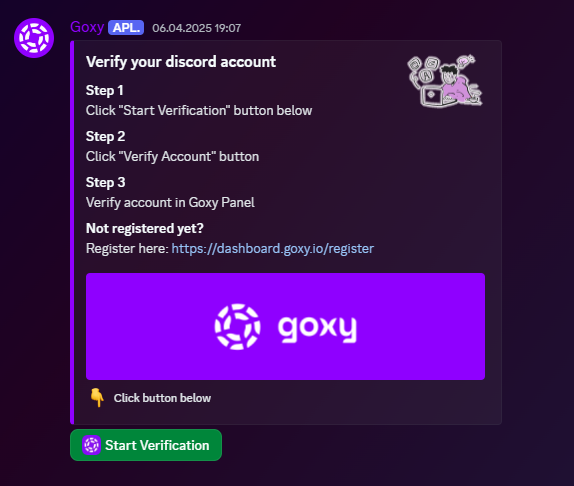
- Then select "Verify Account" - you'll be redirected to your browser.
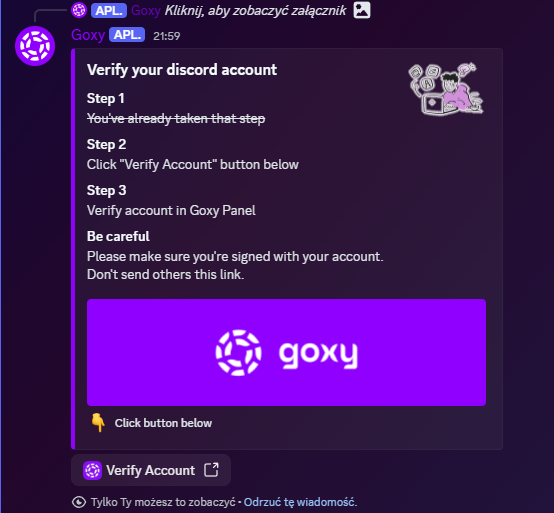
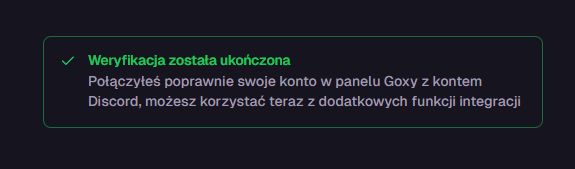
- After a moment, you'll see a confirmation of successful account linking.
Links
Contact us!
We respond to all messages within 24 hours on Discord.
Fast Support
Get help in minutes via our Discord server.
💬 Direct Contact
Message team members directly - we're available daily.
🧭 Full Documentation
Browse our docs to find solutions to common issues.
🎉 Join the Goxy Community!
Get help, tips, and support directly from the team and other users.
JOIN DISCORD