Setting MOTD
This step-by-step guide will walk you through configuring MOTD for your domains in the Goxy Dashboard. You can set individual MOTDs for each domain (e.g., different for mc.goxy.io and io.goxy.mc) or set a default MOTD for the entire network. Ready to give your servers a unique style?
Set up MOTD in minutes and make your network attract players with a unique welcome!
Before You Begin
MOTD is the message displayed on the Minecraft server list. You can set individual MOTDs per domain or a default MOTD for the entire network, which will override settings for all configured domains.
Each domain (e.g., mc.goxy.io, io.goxy.mc) can have its own MOTD, allowing personalized experiences based on the domain players connect through.
Setting a default MOTD for the network means all configured domains will show the same message, simplifying management.
MOTD Configuration
Step 1: Go to the Domains Tab
- On the Goxy Dashboard homepage, you’ll see a list of all your domains.
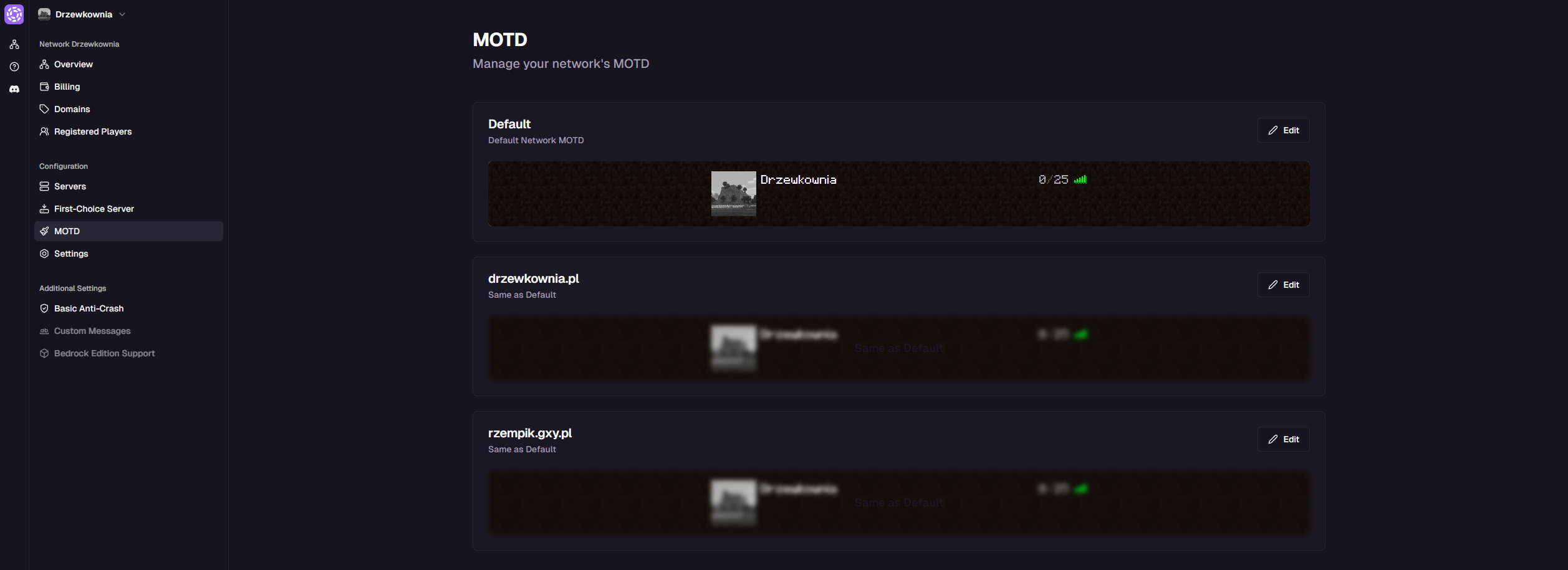
- Select the domain you want to edit, or go to the default MOTD settings for the entire network.
Step 2: Edit MOTD for a Domain
- Click the
Editbutton next to the selected domain (e.g.,mc.goxy.io). - The MOTD editor window will open with a live preview at the top showing how the message will look in-game.
- In the
MOTD Texttab, enter your message. It supports basic Minecraft color codes (e.g.,&afor green) and gradients. - (Optional) Add a server icon in the section below.
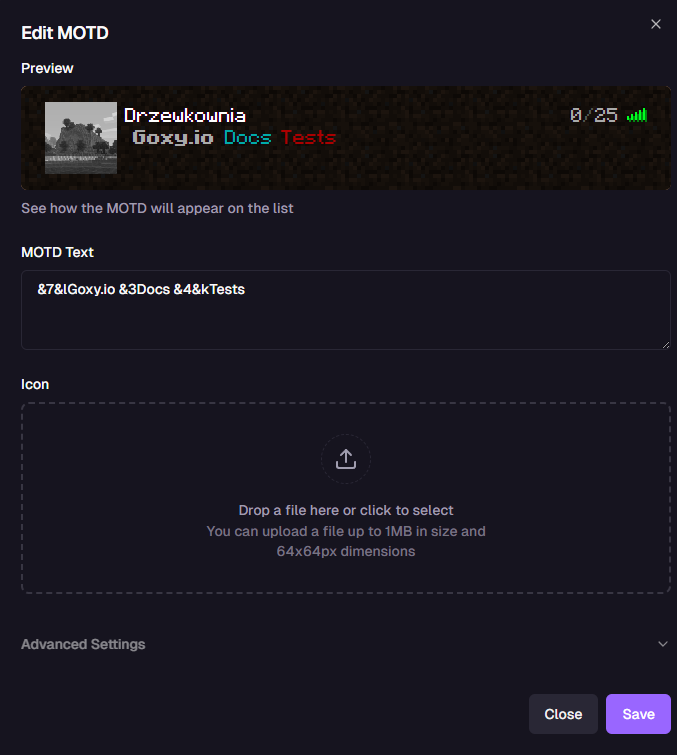 ⚠️Important: Server Icon Requirements
The server icon must be 64x64 pixels and weigh no more than 1 MB.
- Click the
Savebutton.
Your MOTD is configured and visible to players on the server list!
Step 3: (Optional) Advanced MOTD Settings
Advanced MOTD settings are available from the Basic plan onward. Check subscription plans in the Goxy panel to unlock these options!
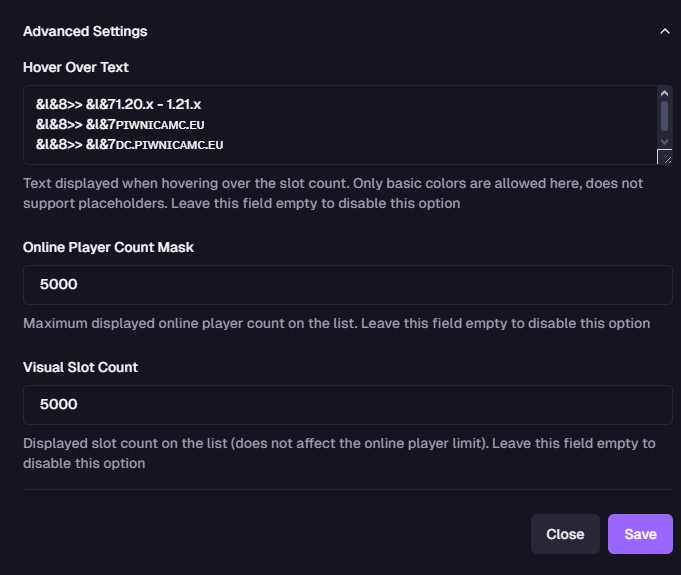
If you have a Basic plan or higher, you can configure the following advanced settings:
- Hover Text:
Text displayed when hovering over the player count on the server list.
- Supports only basic Minecraft color codes (e.g.,
&a). - Does not support placeholders.
- Leave blank to disable.
- Supports only basic Minecraft color codes (e.g.,
- Player Count Mask:
Maximum displayed online player count on the server list (e.g.,
5000).- Leave blank to disable.
- Visual Slot Count:
Displayed slot count on the server list (does not affect the actual player limit).
- Leave blank to disable.
- Leave blank to disable.
- Click
Saveto apply advanced settings.
Your advanced MOTD is configured and ready to attract players!
🌟 Unique Style
Customize MOTD to make your network stand out on the server list.
🎨 Creativity
Use colors and gradients to create eye-catching MOTDs.
⚡ Speed
MOTD setup in just a few clicks — ready in seconds!
Links & Resources
Here are the key links to our resources — all in one place!
| Resource | Link |
|---|---|
| Goxy Homepage | goxy.io |
| Admin Panel | dashboard.goxy.io |
| Status Page | status.goxy.io |
| Discord Community | Join Discord |
| Awesome Goxy List | View list |
| API Documentation | API Docs |
Contact us!
We respond to all messages within 24 hours on Discord.
🎉 Set MOTD & Make Your Network Stand Out!
Join Goxy and give your network a unique identity!
REGISTER FOR FREE